Async TUIs using Bubble Tea
Assumed audience: UI developers, people who program in Go, or anyone just generally interested in making computers to things using code
There was a little bug I ran into a while back but hadn't been important enough for me to fix until yesterday when it started to slow me down
On Tri - a TUI app I built that is something like if tree was searchable and had previews likefzf - I (knowingly) didn't implement async tasks upfront. At the time I was mostly focused on getting the implementation to a good level of UX and free of bugs. As such, there was a clear slowness when navigating the UI while running slow tasks, such as a git diff in a large repository
I sat down yesterday to make the app run previews run in the background - this turned out to be really easy and I thought I'd write about it just to mention why that was the case
Most TUIs I write in Go use the excellent suite of libraries by Charm - and in this particular case, the Bubble Tea TUI framework
Elm Architecture
The Bubble Tea framework is based on the Elm Architecture which is a functional style pattern for building UIs. I think understanding the Elm architecture is a generally useful and the documentation is worth a read for developers building any kind of user interface (even if it's not in Elm)
The core idea is this:
- All UI flows from a Model
- Messages are used to perform Updates on the Model
- A View converts the Model into UI
This is also known as the MVU pattern (Model -> View -> Update)
Using this pattern, we can build a simple implementation of an app that has two bits of independent UI - a counter that increments when the user presses space, and a task runner that runs some heavy tasks triggered by pressing enter
A Sad Implementation
A naive implementation of this using Bubble Tea has the following bits that matter for discussion:
In the Update function, when we press space we increment the counter, and when we press enter we run some tasks:
func (m model) Update(msg tea.Msg) (tea.Model, tea.Cmd) {
	switch msg := msg.(type) {

	case tea.KeyPressMsg:
		switch msg.String() {
		case "ctrl+c", "q":
			return m, tea.Quit

		case "space":
			m.counter++
			return m, nil

		case "enter":
			m.running = true
			m.tasks = doTasks()
			return m, nil
		}
	}

	return m, nil
}
This method then updates the model and returns the updated model - for context, the doTasks function looks like so:
func doHeavyWork() {
	t := rand.IntN(5)

  // irl we'd do something other than sleep
	time.Sleep(time.Duration(t) * time.Second)
}

func doTasks() []task {
	var tasks []task

	for i := range 10 {
		doHeavyWork()
		tasks = append(tasks, task{i, true})
	}

	return tasks
}
We can see this running below:
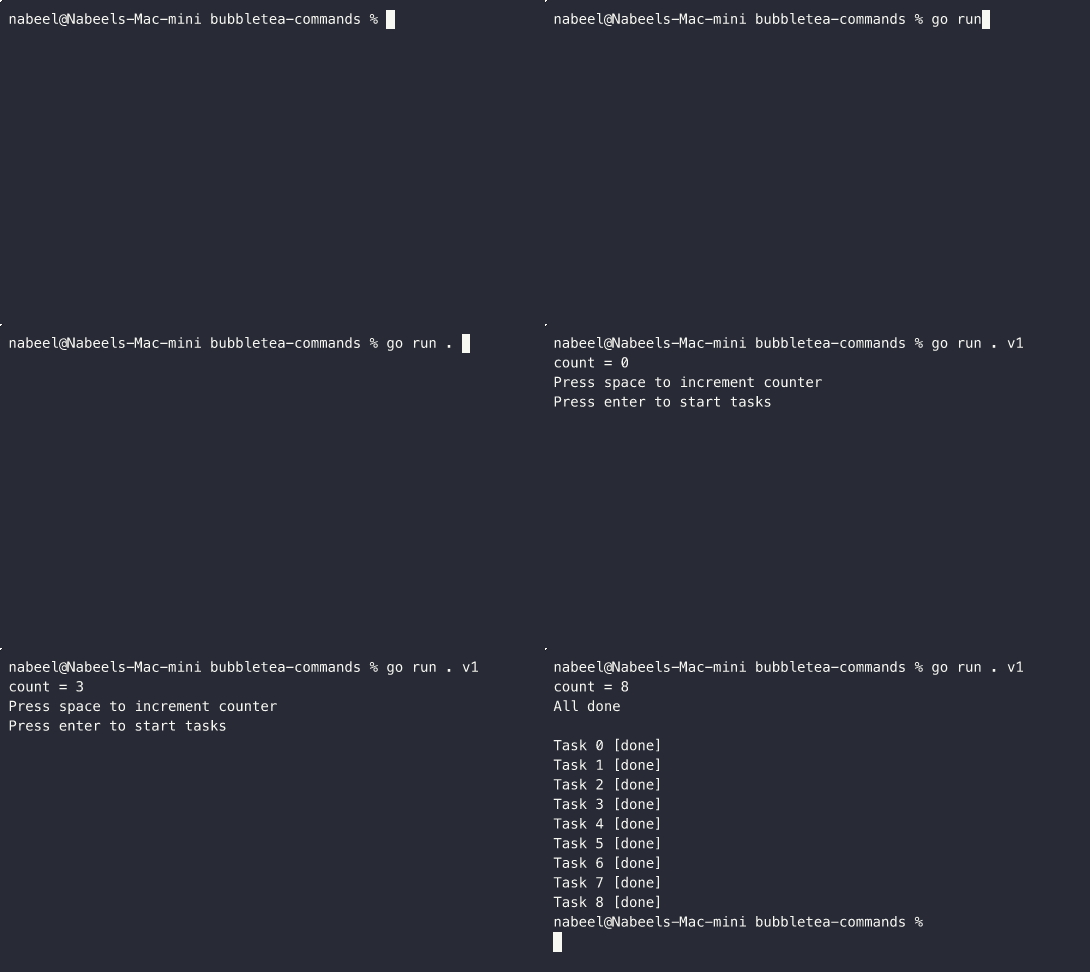
The problem with the above implementation is twofold:
- Bad performance - The UI is blocked while the tasks are running, so the counter doesn't update until after the tasks are run
- Sad UX - There isn't a way to update an in-progress task, would be nice to not have to wait
You can see the full V1 implementation if you'd like
package v1

import (
	"fmt"
	"os"
	"time"

	tea "charm.land/bubbletea/v2"
	rand "math/rand/v2"
)

type task struct {
	index int
	done  bool
}

type model struct {
	counter int
	running bool
	tasks   []task
}

func (t task) string() string {
	status := "busy"
	if t.done {
		status = "done"
	}

	return fmt.Sprintf("Task %d [%s]", t.index, status)
}

func sleepRandomly() {
	t := rand.IntN(5)
	time.Sleep(time.Duration(t) * time.Second)
}

func doTasks() []task {
	var tasks []task

	for i := range 10 {
		sleepRandomly()
		tasks = append(tasks, task{i, true})
	}

	return tasks
}

func initialModel() model {
	return model{
		counter: 0,
		running: false,
		tasks:   []task{},
	}
}

func (m model) Init() tea.Cmd {
	return nil
}

func (m model) Update(msg tea.Msg) (tea.Model, tea.Cmd) {
	switch msg := msg.(type) {

	case tea.KeyPressMsg:
		switch msg.String() {
		case "ctrl+c", "q":
			return m, tea.Quit

		case "space":
			m.counter++
			return m, nil

		case "enter":
			m.running = true
			m.tasks = doTasks()
			return m, nil
		}
	}

	return m, nil
}

func (m model) View() tea.View {
	count := fmt.Sprintf("count = %d", m.counter)
	if !m.running {
		return tea.NewView(count + "\nPress space to increment counter\nPress enter to start tasks")
	}

	tasks := ""
	done := true
	for _, t := range m.tasks {
		if !t.done {
			done = false
		}
		tasks += "\n" + t.string()
	}

	title := "Running Tasks"
	if done {
		title = "All done"
	}

	return tea.NewView(count + "\n" + title + "\n" + tasks)
}

func Run() {
	p := tea.NewProgram(initialModel())
	if _, err := p.Run(); err != nil {
		fmt.Printf("Alas, there's been an error: %v", err)
		os.Exit(1)
	}
}
A Happy Implementation
The solution that's provided by Bubble Tea is to move the IO based work into a Command. A command is used to make things async and is handled by the framework
A command looks like so:
// its type is tea.Cmd
var cmd tea.Cmd

// its value is a function that returns tea.Msg
cmd = func () tea.Msg {
  return  SomeMessage{}
}
So in order to make our work async, we simply need to return a tea.Cmd in our Update function instead of actually doing all the work
Instead of defining a function that does the work, we can define one that returns a tea.Cmd that will do the work:
type taskDoneMsg struct {
	index int
}

func makeTasks() ([]task, []tea.Cmd) {
	var cmds []tea.Cmd
	var tasks []task

	for i := range 10 {
		tasks = append(tasks, task{i, false})
		cmds = append(cmds, func() tea.Msg {
			doHeavyWork()
			return taskDoneMsg{i}
		})
	}

	return tasks, cmds
}
This will offload the work and we'll receive a taskDoneMsg message when the work is done. This also has a nice side effect - by decoupling the creation of the task and the actual execution of it, we can now track the status of each task as it completes
We can do that in the Update function by handling the taskDoneMsg message as well as returning the []tea.Cmds that comes from the makeTasks function instead of actually doing the work upfront
func (m model) Update(msg tea.Msg) (tea.Model, tea.Cmd) {
	switch msg := msg.(type) {

  // handle updating the model when the task is done
	case taskDoneMsg:
		m.tasks[msg.index].done = true
    return m, nil

	case tea.KeyPressMsg:
		switch msg.String() {
		case "ctrl+c", "q":
			return m, tea.Quit

		case "space":
			m.counter++
			return m, nil

		case "enter":
			m.running = true
			tasks, cmds := makeTasks()
			m.tasks = tasks

      // batch the new cmds for bubbletea to handle
			return m, tea.Batch(cmds...)
		}
	}

	return m, nil
}
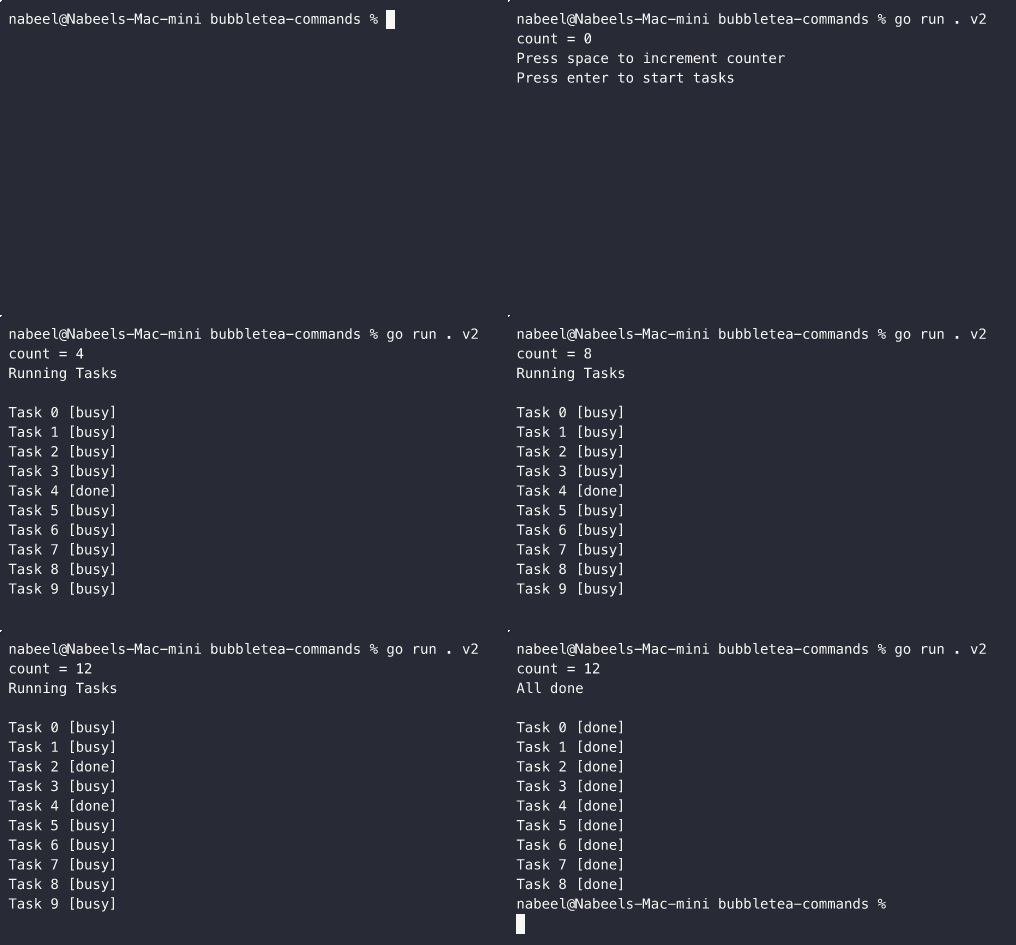
And with that, we've now got a responsive UI that lets the counter work even while the tasks are running as well as makes it possible for us to track task state:
You can see the full V2 implementation if you'd like
package v2

import (
	"fmt"
	"os"
	"time"

	tea "charm.land/bubbletea/v2"
	rand "math/rand/v2"
)

type task struct {
	index int
	done  bool
}

type taskDoneMsg struct {
	index int
}

func (t task) string() string {
	status := "busy"
	if t.done {
		status = "done"
	}

	return fmt.Sprintf("Task %d [%s]", t.index, status)
}

func doHeavyWork() {
	t := rand.IntN(5)
	time.Sleep(time.Duration(t) * time.Second)
}

func makeTasks() ([]task, []tea.Cmd) {
	var cmds []tea.Cmd
	var tasks []task

	for i := range 10 {
		tasks = append(tasks, task{i, false})
		cmds = append(cmds, func() tea.Msg {
			doHeavyWork()
			return taskDoneMsg{i}
		})
	}

	return tasks, cmds
}

type model struct {
	counter int
	running bool
	tasks   []task
}

func initialModel() model {
	return model{
		counter: 0,
		running: false,
		tasks:   []task{},
	}
}

func (m model) Init() tea.Cmd {
	return nil
}

func (m model) Update(msg tea.Msg) (tea.Model, tea.Cmd) {
	switch msg := msg.(type) {

	case taskDoneMsg:
		m.tasks[msg.index].done = true
		return m, nil

	case tea.KeyPressMsg:
		switch msg.String() {
		case "ctrl+c", "q":
			return m, tea.Quit

		case "space":
			m.counter++
			return m, nil

		case "enter":
			m.running = true
			tasks, cmds := makeTasks()
			m.tasks = tasks

			return m, tea.Batch(cmds...)
		}
	}

	return m, nil
}

func (m model) View() tea.View {
	count := fmt.Sprintf("count = %d", m.counter)
	if !m.running {
		return tea.NewView(count + "\nPress space to increment counter\nPress enter to start tasks")
	}

	tasks := ""
	done := true
	for _, t := range m.tasks {
		if !t.done {
			done = false
		}
		tasks += "\n" + t.string()
	}

	title := "Running Tasks"
	if done {
		title = "All done"
	}

	return tea.NewView(count + "\n" + title + "\n" + tasks)
}

func Run() {
	p := tea.NewProgram(initialModel())
	if _, err := p.Run(); err != nil {
		fmt.Printf("Alas, there's been an error: %v", err)
		os.Exit(1)
	}
}
Summary
That's it - no Goroutines or channels needed, a pretty good abstraction on the side of the framework - and minimal effort needed from us
A small aside, I've started working on what will probably be a fairly sizeable side project. As such, I've gotten absolutely nothing done on that while somehow managing to put together a few blog posts (this one + another one about eid + another one about tri), update my photo galleries (general nl and stuff from last winter) on my site, and fix a bunch of random things in other random side projects just this week - oh the power of procrastination